
September 2022
Conditional logic, generating documents & more
Conditional logic for your fields and tabs
Over the past few years, we have seen our customers develop some huge object blueprints. But not all customers were always so eager to expand beyond a certain point since seeing 50+ fields where (in most cases) only 10 fields were relevant gives a bad experience.
Now, you can dynamically show, hide and make read-only all fields and tabs of an object blueprint using conditional logic rules. Do you have 50+ fields? Just hide the irrelevant ones and show them again when it is needed again in the context you are working with.

Generate dynamic documents with your data
Create Word or PDF documents with dynamic information loaded from your VobeSoft environment. You create a word template with your static information and, with custom tags, define where to import dynamic information.
The more data you capture in VobeSoft, the bigger the impact of having a document generation tool. No longer have your users manually insert data into documents.
Learn more about document generating ->
🦋 Improvements
- It is now possible to upload .HTML files inside the files tab
- The "realized dossier description" is now also displayed within linked object fields
🪲 Bug fixes
- The typing indicator when you are in a long text field jumps to the beginning when you start typing
- When reporting a problem, the success notification doesn't show the close icon
- Blocked users are shown inside the user field
A new way to save, with save and close
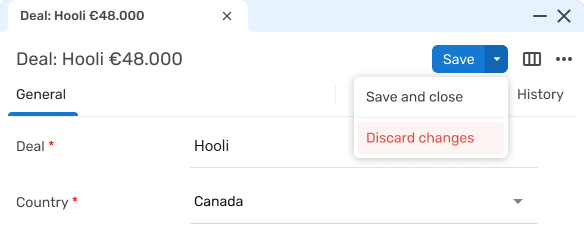
Saving is something you do dozens of times a day, so it's worth getting right. The save icon becomes a proper save button, easier to spot and harder to miss, and it now doubles as a dropdown. Click the arrow next to it and you'll find two more actions: save and close, which writes your changes and takes you straight back out of the item in one step, and discard changes, which drops your unsaved edits (after a quick confirmation, so an accidental click can't cost you anything).
And now that saving lives in a button with a dropdown, we've got room to grow it. This is the foundation for more saving options down the line.
Heads-up: this change goes live on 7 July 2026.We're announcing it a little ahead of time so you can let your team know the save control will look and behave a little differently. Until 7 July, saving works the way it does today.
Reuse the same choices everywhere with choice lists
If you've ever set up the same set of choices on more than one field, you know the maintenance that comes with it. A list of departments, a set of priorities, your sales stages, typed out again on every field that needs them, and re-typed on every field whenever one option changes. Miss one and your data quietly drifts out of sync.
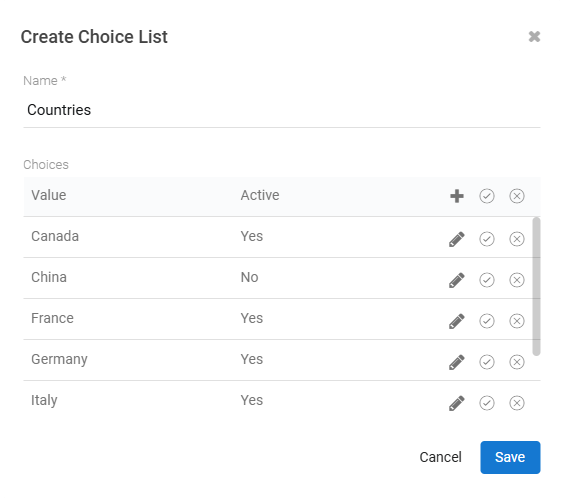
With choice lists you define a set of choices once and reuse it across as many choice fields as you like. Update the list in one place and every field that uses it follows along. Take a country list: the same long set of options, maintained separately on addresses, on customers, on shipping details. As a choice list it becomes one source of truth that every one of those fields draws from.
It's the kind of groundwork that pays off most as your configuration grows, and we're eager to see how you put it to work.
🦋 Improvements
- Notification emails now come from our noreply address instead of info, with replies routed to support. If you've filtered notifications on the old info address, point those filters at the new sender.
- The item modal now supports up to five split-view panels, up from three. The extra layouts live under "show more" in the split-view selector.